|
|
|
|
|
|
|
Fighting
Malware (Adware/Spyware/Scareware and Trojans/Worms/Viruses)
Most important
practice - prevention!
-
If you have Java, Flash and/or Adobe Acrobat Reader
installed, make sure it is the most recent
version. If it is not the most recent version, uninstall all
versions and install the most recent version. If you
have the most recent version installed already, make sure to uninstall
all older versions.
-
Even though anti-virus and anti-spyware software may run
in
the
background
and scan your computer in real time, it's a good idea to run occasional
full-system scans. If possible, run scans while
in safemode and disconnected
from the Internet. If malware is found and removed, re-run scans
again until no malware is found.
-
Be very conscientious of the websites that you plan to
visit and
the
e-mail attachments that you receive. Probably the most damaging
websites are the ones relating to pornography, online gaming, coupons
and
pirated ("cracked") software/music/movies. Unfortunately, even legitimate websites
can have ads embedded in them that can attempt to install malware on
your computer. Also, be careful about
visiting sites that appear to be registered in foreign countries.
-
Be very conscientious of how you respond to web browser
popups that you
receive
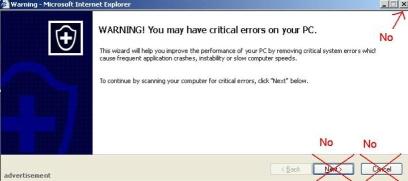
on your computer. If you receive a popup similar to the one shown
below, scan the
computer for malware. To close the popup, instead
of clicking on
any buttons (including any Close, No, Cancel, Exit buttons or the X in
the upper right corner), attempt to close the popup by
holding down the Alt key and hitting the F4 key. That should
close
the active window (i.e. the popup window in this case). Here's
an
example of a bogus web browser warning popup window and how not to
close it:
-
Beware of alerts that you receive from the system tray
(the lower right corner of your desktop). Malware that is already
installed on your computer can try to trick you into installing
additional malware or buying software to remove their own
malware! Should one of these alerts be displayed, do not respond
as it describes. Scan the computer immediately for malware.
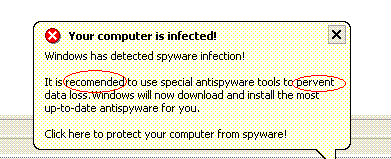
Here's an example of a bogus system tray warning (note the incorrect
spelling of words - a certain giveaway!):
-
Beware of "free" software. Much of the "free" stuff
out
there has a license agreement with something in it to the effect
of "by installing this software you agree that you will receive
advertisements from our sponsors." Read the license agreements
when you
install software! Of course, other "free" software
exists that never even tells you it will install garbage on your
computer. Probably the most common examples of "free" software
which may
install malware on your computer are screensavers, cursors,
smileys, emoticons, games, coupons and web search tools.
|
|
|
|
|
|
|
|
|
|
|
|